

Contact Us
-
Address: B-26, B Block, Sector 2, Noida, Uttar Pradesh 201301
-
Email: Contact@wavixo.io
-
Call: +91 9625655385
WhatsApp Business Meta Frequency Capping: What It Is & How to Solve It
A complete guide for businesses using WhatsApp Business API
If you are running WhatsApp marketing campaigns using the WhatsApp Business API and suddenly notice a spike in failed message deliveries — you are not alone. Thousands of businesses across the globe are hitting the same wall. The culprit? Meta's Frequency Capping. In this article, we break down exactly what frequency capping is, why Meta introduced it, and — most importantly — how you can work around it to maintain strong delivery rates for your campaigns.
1. What Is Meta's Frequency Capping?
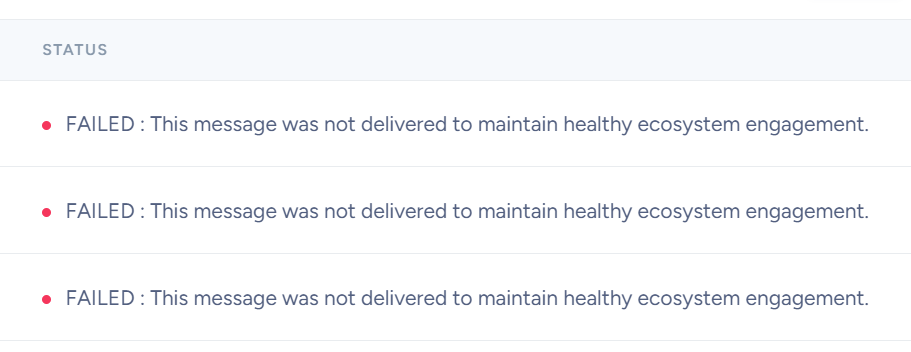
Frequency capping is a delivery control mechanism introduced by Meta to limit the number of promotional (marketing) messages a single WhatsApp user can receive from any business within a defined rolling time window — typically 24 to 48 hours. When a user has already received a certain number of marketing messages from various businesses and has not engaged with them, Meta's system will begin blocking further promotional messages from reaching that user. The message will fail, and if you are using a platform like WAvixo, the failure reason will appear as:
The correct sequence with Wavixo looks like this:
Error: "Unhealthy system activity" or "This message was not delivered to maintain healthy ecosystem engagement."
It is critical to understand that frequency capping is a per-user limit, not a per-business limit. It does not mean your business has been penalised. It means that specific user has already hit their cap for promotional messages that day — regardless of which business sent them.
3. What Messages Does Frequency Capping Affect?
Frequency capping only applies to outbound marketing/promotional messages. Here is a quick breakdown of what is and is not affected:
| Message Type | Affected by Capping? | Notes |
|---|---|---|
| Marketing / Promotional | ✔ Yes | Main target of frequency capping |
| Utility (order updates, reminders) | ⚠ Rarely | Less common but possible |
| Authentication | ✖ No | Not affected |
| User-initiated (service messages) | ✖ No | Free-form within 24hr window |
| Click to WhatsApp Ads | ✖ No | Fully exempt from capping |
4. Understanding the Errors: 131049 vs 131026
When your messages fail due to frequency capping related issues, two error codes are most commonly encountered. Understanding the difference is essential for diagnosing the right problem.
Error 131049 — Engagement-Based Throttling
This is WhatsApp's engagement-based throttling mechanism. It is not a permanent block or a penalty against your business. It means:
- The recipient is already receiving a high volume of promotional messages from multiple senders
- They have hit their engagement limit within a specific time window
- Meta has deprioritised further promotional delivery to that user
The fix for 131049 is a structured warm-up and retry protocol — covered in detail in the next section.
Error 131026 — Non-WhatsApp Number
This is an earlier and more damaging warning sign. It means the recipient number is not registered on WhatsApp at all. A high rate of 131026 errors signals critically poor list quality — and this creates a compounding problem:
Error 131026 — Non-WhatsApp Number
Warning: High 131026 rates damage your sender reputation. Your template rating drops. Your number quality drops. Your 131049 rate rises as a result. Fix your list quality before scaling any campaign.
5. WhatsApp API Pricing — What It Actually Costs
One of the most common surprises for businesses new to the WhatsApp Business API is discovering that there is no single flat rate per message. What you actually pay depends on two interacting variables.
Variable 1 — Recipient Country
Pricing is determined by the destination country of the number you are messaging — not your own country or your business location. For example, sending a message to a number in India is priced differently from sending to a number in the US, Brazil, or Germany. Markets are grouped into tiers, and each tier has its own rate card.
Variable 2 — Message Category
Marketing, Utility, and Authentication messages are each billed at different rates. This is one of the key reasons correct category assignment matters — beyond compliance, it has a direct and significant impact on your cost per message.
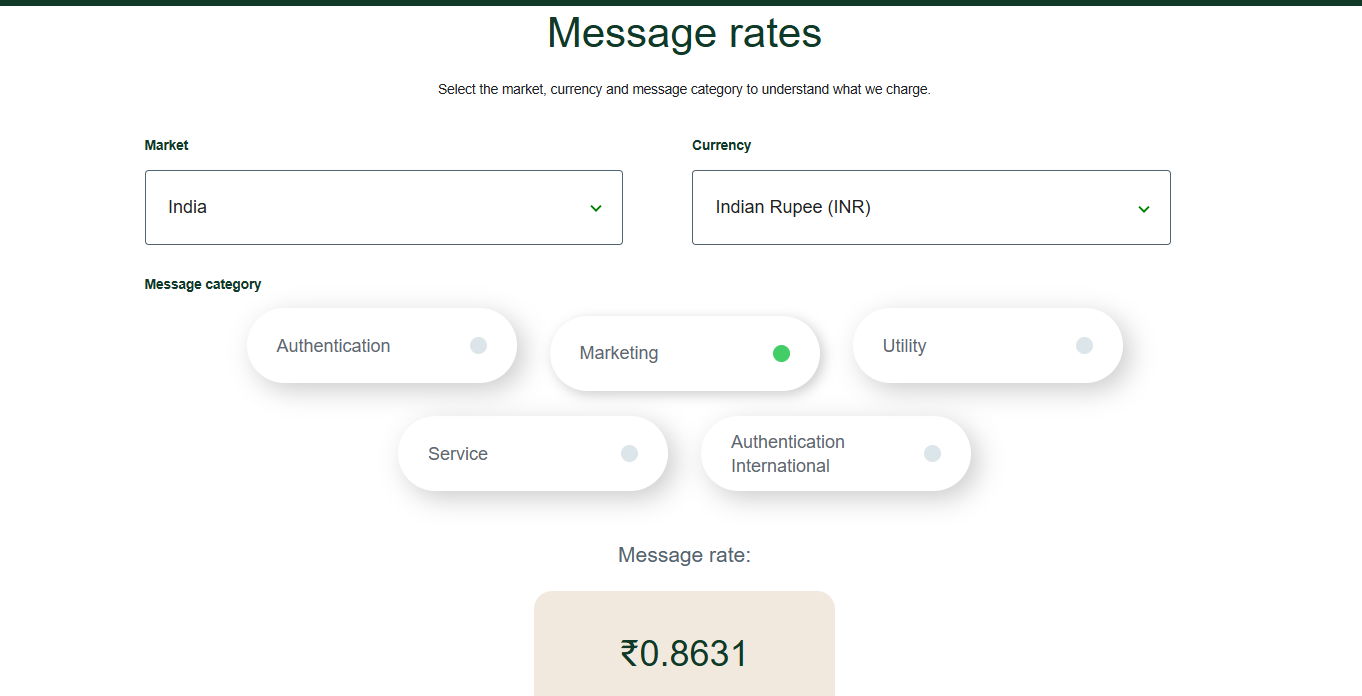
| Category | Typical Cost (India) | Typical Cost (US/EU) | Notes |
|---|---|---|---|
| Marketing | Higher rate | Highest rate | Most campaigns fall here |
| Utility | Lower rate | Lower rate | Order updates, reminders |
| Authentication | Lowest rate | Varies | OTPs, verification |
Why Category Misassignment Is Costly
Because utility messages are cheaper to deliver, some businesses are tempted to label marketing content as utility to reduce costs. This is a mistake. WhatsApp’s classification algorithm independently reviews all submitted templates and will reclassify them. Only genuine service or operational communication — order confirmations, shipping updates, appointment reminders — qualifies as utility. Attempting to game the category system does not just risk reclassification. It also damages your template rating and can contribute to higher 131049 error rates over time.
6. The Warm-Up Protocol: Solving Error 131049
The most effective solution to Error 131049 is not waiting it out or switching numbers — it is a structured warm-up protocol that builds Meta’s trust in your sender number over time. Every reply your recipients send is a positive engagement signal to Meta, telling their system your messages are welcome.
Here is the exact sequence to follow:
Batch 1 — Send to first 20 contacts
Actively urge these recipients to reply. Replies are engagement signals that build sender trust with Meta.
Batch 2 — Send to the next 20 contacts
Again, encourage replies. Keep building your engagement signal before scaling further.
After 24 hours — Retry all 40 contacts from Batches 1 & 2
By now, your engagement signals have warmed the number. Expect ~90% delivery on the retry.
Batch 3 onwards — Scale to 100 contacts
Continue scaling gradually: 100 → 250 → 500 and beyond as delivery rates and Meta confidence grow.
7. Retry Logic That Actually Works
When messages fail with 131049, do not aggressively retry in rapid succession. Follow this retry framework instead:
- Let failures accumulate into a dedicated retry list — do not retry immediately
- Wait a minimum of 6 hours before sending to failed numbers
- Cap retries at 10 attempts maximum per number
- Always vary the retry time window — different time of day, different day of week
- After 24–48 hours, retry the failed list — this can boost delivery rates by 20–30%
Think of it as a numbers game with an engagement model underneath. Some 131049 failures simply require a different delivery window. Retrying at a different time clears many failures that persistent same-day retries never would.
8. Best Practices to Reduce Frequency Capping Impact
Short-term fixes address individual campaigns. Long-term health requires building smart habits into your contact collection, messaging strategy, and list management.
Before Sending
- Always collect opt-in from users before messaging them — inform leads in forms and contact flows that you may reach them on WhatsApp
- Validate WhatsApp number eligibility at every contact collection point — forms, CRMs, import flows
- Never import bulk lists without cross-checking against previous non-deliveries
During Campaigns
- Include a clear and easy unsubscribe option (e.g., reply STOP) in every campaign template
- Do not schedule too many messages in a short time window — more messages do not mean more conversions
- Send content that engages, not just content that sells — higher engagement improves your sender score
- Limit cold broadcasting — sending to large unverified lists is the fastest way to get mass blocks and damage your quality rating
Ongoing Maintenance
- Remove or suppress non-engaging contacts after a defined number of non-responses
- Track template ratings and number quality scores continuously — not just after problems appear
- Monitor 131026 error rates as an early warning system for list quality degradation
9. The Complete Checklist
Use this checklist to ensure your WhatsApp outreach operation is built for sustainable, high-delivery performance:
- 1. Clean contact lists with minimal 131026 errors — validate WhatsApp eligibility before import
- 2. Engagement tactics built into every template — quick replies, clear CTAs, easy opt-outs
- 3. Proper template category assignment — Marketing, Utility, or Authentication — submitted and approved before campaigns launch
- 4. A structured warm-up protocol for new sender numbers
- 5. Retry logic in place — accumulate failures, wait 6+ hours, cap at 10 retries
- 6. Continuous quality monitoring — template ratings and number quality scores
- 7. A working dashboard for tracking delivery, replies, and handing warm leads to your sales team
Final Thoughts
Meta’s frequency capping is not a punishment — it is a signal. It tells businesses that WhatsApp’s value as a marketing channel depends entirely on the quality and relevance of what gets sent through it.
Businesses that adapt will see stronger open rates, better engagement, and more meaningful customer conversations.
The solution is not to fight the system but to work with it: warm up your numbers, send to opted-in and engaged audiences, give recipients an easy way out, and retry failed messages strategically. Done right, WhatsApp remains one of the most powerful direct communication channels available — but it rewards discipline.
WhatsApp Product Guide (wavixo.io)
Please note that WAvixo AI does not provide training, hands-on setup, or campaign creation services. We will assist you with your WhatsApp number setup and support you if you run into any issues. For everything else, we have a detailed step-by-step playlist available for your reference.
Ready to Start Sending Smarter?
See how WAvixo handles your WhatsApp outreach end-to-end — from contact import to delivery reporting.
Get Started with WAvixo →